Disc Golf Valley
- 3.3
- Rating
- 1.00M
- Installs
- Free
- Price
 Analysis by App-foxy
I approached Disc Golf Valley as a quick sports game first, but its accessibility became just as important as its throwing model. Disc golf looks simple on paper: choose a disc, aim, adjust the flight, and try to finish a hole efficiently. On a phone, however, the quality of that interaction depends on whether the course is easy to read, whether the controls tolerate imprecise gestures, and whether the game fits comfortably into the player’s surroundings. My experience is that this is a focused, attractive option for people who enjoy planning shots, although it asks more visual attention and finger control than its relaxed presentation might suggest.
Developed by Spinoff Games AB, this free sports game has grown into a widely played mobile title, with more than a million installs. It carries an Everyone age rating, which makes it approachable for families and younger players, while its average rating of 3.3 from roughly twelve thousand ratings suggests a more mixed experience than the simple concept might imply. I can understand that split: the basic idea is inviting, but the precision required to play well may not suit every player or every phone.
How Disc Golf Valley handles clarity, control, and different playing situations
I focus here on how clearly the game communicates a shot and how much control it leaves in the player’s hands. That balance can make a quick round feel approachable or turn it into a test of patience, depending on your screen, grip, and surroundings. Thinking through those practical differences also helps identify where this style of play fits best.
You May Also Like

 Google Keep - Notes and lists
Google Keep’s Quiet Growth Shows the Appeal of Simpler Notes
As mobile work gets busier, Google Keep keeps winning a simple contest: capture a thought quickly, find it later, and get on with the day.

 Blood Strike: 2.5 Anniversary
Blood Strike’s Loadouts Turn Every Drop Into a Tactical Gamble
A close look at Blood Strike’s custom loadouts: how fast access to signature weapons reshapes its battle royale rhythm, rewards preparation, and narrows the gap between fights.

 Pandora - Music & Podcasts
Pandora’s Music Is Easy to Start, but Harder to Recover
Pandora’s strength is its low-effort path from a seed to a station. Its weak spot is how much confidence it asks you to place in connection, setup, and quiet recovery.

 8 Ball Pool
 Is Built on Rivalries, Rematches, and Routine
A close look at the rivalries, rematches, shared routines, and unanswered safety questions that turn a quick pool match into a persistent mobile community.

 Samsung Music
’s Quiet Strength Is Playing What You Already Own
Its reach comes less from spectacle than from dependable access to a personal library. That simplicity is both the app’s strongest retention engine and its ceiling.

 AccuWeather: Weather Radar
AccuWeather Review: A Quick, Clear Forecast for Everyday Decisions
For everyday plans, the best forecast is the one you can understand quickly. AccuWeather makes rain timing, radar, and local conditions easy to act on, with a few trade-offs.
More From Our News Desk



Readable courses make the first few rounds approachable
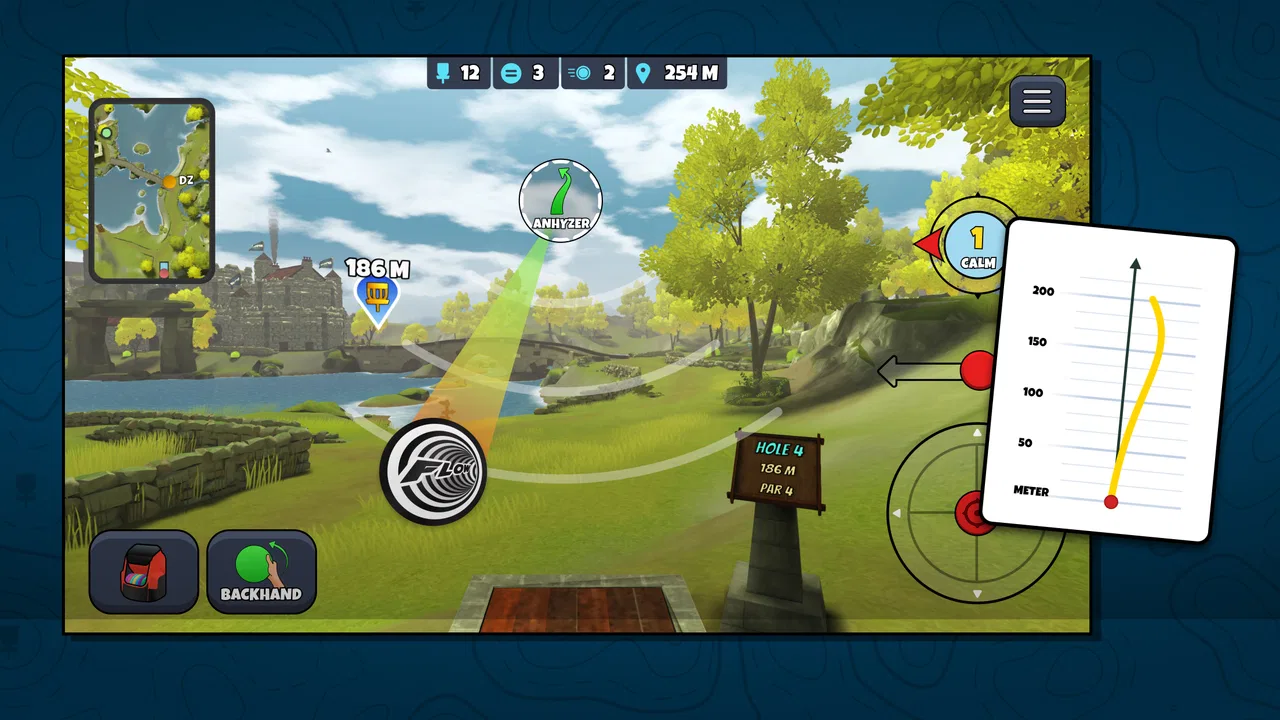
The strongest part of the presentation is that the game communicates its central task quickly. I do not need to learn a complicated sports rulebook before making a throw. The course, basket, disc, and intended direction are the elements that matter immediately, so a new player can begin experimenting without feeling buried in menus. That directness is valuable for anyone who prefers visual learning over long explanations.
At the same time, disc golf is a game of angles and distance, so readability becomes more demanding as the shot gets harder. A player has to distinguish the fairway from hazards, understand the shape of the hole, and judge where the disc may finish rather than merely where it starts. On a smaller phone, those details can compete for attention. I found it more comfortable to pause before throwing and study the whole layout instead of rushing through the shot setup.
That pause is also a useful habit for players with attention-related difficulties. The game rewards a deliberate rhythm: inspect, choose a disc, set the throw, then commit. It is less friendly if you expect every decision to be obvious at a glance. When the screen feels visually busy or the course perspective makes the landing area hard to judge, I would rather rotate the phone, increase general device text size where possible, or play on a larger screen than rely on hurried guesses.
Navigation is uncomplicated during play, which is a genuine strength. The experience stays centered on the course instead of making the player pass through layers of management screens before every attempt. That helps people who are easily distracted and makes the game suitable for a short break. The trade-off is that a compact interface leaves less room for generous labels or large controls. Players with limited vision may need to test the game personally, because a clean layout is not automatically a high-contrast or magnified layout.
Precision gestures create both satisfaction and friction
The throwing interaction is where the game feels most like a real skill exercise. I have to think about direction, timing, and the disc’s flight rather than tapping a single button to produce an automatic result. That gives successful shots a satisfying sense of ownership. When a carefully planned throw works, it feels like I solved a small physical puzzle rather than simply selected the correct menu option.
That same design can be a barrier for players with tremors, reduced dexterity, joint pain, or difficulty maintaining a steady finger movement. A gesture that feels natural to one person may be tiring or inconsistent for another. The game’s appeal depends heavily on this control, so it is not the kind of title where a player can ignore precision and still experience the complete challenge. I would recommend trying a few holes with the phone supported on a table or cushion; stabilizing the device can make the interaction less demanding than holding it in one hand.
Two-handed play may also help. One hand can keep the phone steady while the other performs the throw, reducing accidental movement. That is a small but practical adjustment, especially during longer sessions. Players who use a stylus may find fine aiming easier, although the feel will depend on the particular device and stylus. I would not treat that as a guaranteed solution, but it is worth considering for anyone who finds fingertip control tiring.
The game is less suitable for someone looking for a fully hands-off sports experience. Compared with a simple arcade title that uses large directional buttons, this one asks the player to express the shot through a more continuous motion. That is a meaningful difference, not a minor control preference. If your priority is minimal motor effort, a turn-based sports game with discrete commands may be a better fit.
Visual and sensory comfort depends on the player’s setup
Disc golf naturally benefits from visual information, and this mobile version follows that pattern. The player needs to read space, estimate paths, and notice where the basket sits in relation to the terrain. Someone with strong vision and a modern display can settle into that process quickly. Someone with low vision may encounter difficulty when distant targets, course textures, and small interface elements blend together.
I would approach the game with realistic expectations if you rely on a screen reader, magnification, or strong contrast adjustments. The actual play area is visual by nature, and a screen reader cannot replace the spatial judgment involved in choosing a line. Device-level magnification may help inspect parts of the interface, but it can also make it harder to see the complete hole at once. In practice, the best experience is likely to come from balancing display size and overall visibility rather than enlarging one element as much as possible.
Players sensitive to motion may also want to keep sessions short at first. Looking at a changing course perspective and repeatedly following a disc’s flight can be comfortable for one person and unpleasant for another. I did not find the game stressful in the way a fast competitive action game can be, because each throw gives me time to think, but the visual movement is still part of the experience. Sitting farther from the screen, using a stable surface, and taking breaks are sensible precautions if motion or eye strain becomes noticeable.
Sound is not the main source of information during a throw, which is helpful in shared spaces and for people who play without audio. I can treat it as a quiet, visual sports game rather than one that depends on spoken instructions or constant sound cues. That makes it easier to use in a waiting room, on public transport, or beside someone who is sleeping. The limitation is that silent play places even more responsibility on the visual interface, so it does not solve the needs of players who cannot comfortably follow the screen.
Short sessions work well in everyday life
One of the most practical ways to use the game is as a structured break. I can imagine opening it while waiting for an appointment, playing a few holes, and stopping without needing to commit to a long match. The pace is calmer than many mobile sports games, and the planning element gives the break a clear shape. For someone who becomes overwhelmed by rapid timers or crowded multiplayer screens, that quieter rhythm is a real advantage.
A realistic example is a player with limited energy who wants a game that can be enjoyed while seated and with frequent pauses. I would play with the phone propped up, complete a small portion, and put it away before hand fatigue builds. Because each shot is self-contained, stopping after an imperfect attempt does not feel as disruptive as leaving a real-time match. This makes it more adaptable to fluctuating concentration or physical comfort than a game that demands uninterrupted action.
It can also work as a shared activity. A friend who already understands disc golf can explain why a particular line is risky, while a newcomer learns through observation rather than a long tutorial. That social approach may be especially useful for players who prefer verbal guidance. However, the person holding the phone still has to perform the gesture, so a helper can explain or demonstrate but cannot remove the game’s motor demands entirely.
The free entry point is useful for testing that fit. There is no purchase price to overcome before discovering whether the controls suit your hands or eyes. The game includes in-app purchases ranging from less than a dollar to around fifty dollars per item, so I would be careful with spending if the phone is shared with a child. The Everyone rating supports its broad audience, but an age label does not replace sensible purchase controls or adult guidance on a family device.
Where it differs from simpler sports alternatives
Compared with a conventional arcade sports game, this title gives me more responsibility for the shot itself. A simpler alternative may offer immediate feedback through a few large buttons, making it easier for players with limited fine motor control or those who want a fast, low-effort session. Disc Golf Valley is more rewarding when I enjoy adjusting my approach and learning from a poor landing.
It also differs from a realistic console-style sports simulation. A console game may provide a larger display, more elaborate control options, or physical controllers that reduce the need to drag on glass. This mobile format is easier to carry and start quickly, but the phone screen gives less space for judging distant targets. If you already own a console and prioritize detailed accessibility settings or controller flexibility, that alternative may serve you better.
Against a casual puzzle game, the sports identity matters. The decisions are spatial and physical rather than purely logical, and the result of a throw can feel pleasantly unpredictable. Yet players who need strong turn-by-turn text descriptions may find a conventional puzzle more accommodating. I would choose this game for visual planning and tactile involvement, not for maximum interface customization.
Small adjustments that improve the experience
I found that the best results come from treating the phone as part of the control setup. A clean screen, steady seating position, and enough surrounding light make it easier to distinguish the course from reflections. Glare is particularly unhelpful because it can hide exactly the visual information needed for a careful throw. Playing in a dim room may look comfortable at first, but it can increase eye strain when the screen becomes the only bright object in view.
Another useful approach is to separate learning from scoring. During early rounds, I would focus on understanding how the throw responds rather than trying to make every shot perfect. That reduces pressure for players who need extra time to build motor familiarity. It also reveals whether the gesture itself is comfortable. If repeated attempts cause pain or fatigue, that is a sign to stop rather than push through in pursuit of a better result.
For players who struggle with concentration, I recommend deciding on one goal per session: learn a course shape, practice a particular type of throw, or simply finish a few holes. Trying to optimize every decision at once makes the game feel more demanding than it needs to be. The calm pace supports this approach, and it turns a potentially frustrating session into a manageable routine.
Families should also consider how the game is introduced. A younger player may enjoy the immediate idea of throwing a disc but become frustrated when a precise line does not work. Playing together and discussing the next shot can make the learning curve feel collaborative. Since purchases are available inside the free game, I would also review the device’s purchase protections before handing it to a child.
Remaining barriers are mostly practical rather than conceptual
The main accessibility concern is not that the rules are hard to understand. It is that the game’s central skill depends on visual judgment and controlled touch. That combination naturally excludes some players or makes the experience tiring. A person with limited dexterity may manage short sessions but struggle with repeated attempts. A person with low vision may understand the objective yet still have difficulty locating the basket or reading the course line.
The phone itself can change the experience considerably. A small display, slippery case, weak touch response, or poor viewing angle may turn a manageable gesture into an irritating one. This means two players can have noticeably different results even when using the same game. I would not judge the controls after one rushed attempt on a moving bus; I would test them in a stable position with the screen clean and the device held in the way I expect to play.
There is also a difference between being suitable for everyone in age terms and being equally usable by everyone. The Everyone rating tells me the subject matter is broadly appropriate, but it does not mean every ability level will receive the same experience. That distinction matters for parents, older players, and anyone choosing games specifically around accessibility. The title is welcoming in concept, yet its strongest challenge is inseparable from its physical and visual interaction.
Progress can add another kind of pressure for players who dislike repeated practice. A missed line may encourage me to try again, but someone looking for immediate success may see the same learning process as tedious. This is not a flaw for a skill-based sports game, though it does narrow the audience. If you prefer predictable results, automatic assists, or very forgiving controls, a more casual alternative will probably feel better.
My inclusive verdict after spending time with it
I recommend Disc Golf Valley to players who enjoy calm, visual sports challenges and are comfortable making precise gestures on a touchscreen. It is especially appealing for short, seated sessions, quiet environments, and people who like learning through experimentation. The free price makes it easy to test, while the broad age rating makes it a reasonable family option when purchases are managed responsibly. Its current version is 1.686, and the game has been available since late 2018, giving it the feel of an established mobile title rather than a brief novelty.
I would be more cautious if you have low vision, significant hand tremors, joint pain, or a strong need for alternative input methods. The game’s core pleasure comes from aiming and throwing, so those needs are not peripheral details that can be ignored. A larger device, a stable playing position, and shorter sessions may improve matters, but they cannot change the fact that the game remains visually and manually demanding.
My final view is positive but specific: this is an accessible idea, not an universally accessible control system. The rules are easy to grasp, the pace is forgiving, and the game fits naturally into ordinary breaks. Its limitations appear when a player needs large targets, extensive non-touch options, detailed audio guidance, or very low physical effort. If your preferences match its thoughtful throwing style, it can become a satisfying pocket sports game. If they do not, choosing a less precision-focused alternative is the more inclusive decision.
Spinoff Games AB has built something that rewards patience without demanding the noise and speed associated with many mobile sports titles. I would keep it installed for moments when I want to concentrate on one shot at a time, but I would not recommend it blindly to every player. Try it in the setup you actually use, pay attention to hand and eye comfort, and judge the experience by whether the controls feel inviting rather than merely possible. That test says more about its suitability than its simple premise ever could.
FAQs for Disc Golf Valley
01What is Disc Golf Valley?
Disc Golf Valley is a mobile disc golf game that lets you play virtual rounds across different courses, practice throws, and compete in challenges. It combines simple touch controls with physics-based disc flight, so selecting the right disc, angle, power, and release direction matters. The game is suitable for casual players, but its wind, terrain, and scoring systems also provide depth for users who enjoy improving their technique over time.
02Is Disc Golf Valley free to download and play?
Disc Golf Valley can generally be downloaded and played without an upfront purchase, allowing you to try the core gameplay before spending money. However, the experience may include optional in-app purchases, advertisements, or premium features depending on the platform and current version. You can usually progress through regular play, although some paid options may help unlock content or provide additional convenience more quickly.
03Does Disc Golf Valley require an internet connection?
An internet connection is recommended for Disc Golf Valley because online access may be needed for account features, events, leaderboards, updates, advertisements, and synchronized progress. Some gameplay elements may work while offline, but availability can vary by device and version. If you plan to compete in multiplayer activities or access the latest challenges, playing while connected is the safest option.
04Is Disc Golf Valley suitable for beginners?
Yes, Disc Golf Valley is accessible to beginners, especially because its basic controls are easy to understand: you typically aim, adjust your throw, and release the disc using touch gestures. Nevertheless, the game has a learning curve. Wind direction, disc characteristics, elevation, obstacles, and putting accuracy all affect the result. New players should expect to experiment with different discs and gradually learn each course.
05What devices can run Disc Golf Valley, and is progress synchronized?
Disc Golf Valley is designed for modern Android and iOS smartphones and tablets, but compatibility and performance depend on the operating-system version, available storage, and device hardware. Older devices may experience slower loading or reduced smoothness. Progress synchronization can depend on how the game handles accounts and platform services, so it is wise to connect the game properly and check its settings before changing devices or reinstalling it.
Pros
- Realistic flight physics make every throw feel skill-based and rewarding.
- Large variety of courses keeps rounds fresh and encourages exploration.
- Frequent challenges provide clear goals for both new and experienced players.
- Simple controls work well on phones and tablets.
- Online tournaments add competition beyond regular solo rounds.
Cons
- Progression can feel slow when unlocking better discs and new courses.
- Some advanced shots require precise touch that may be difficult on small screens.
- Wind and terrain effects can make certain holes feel unforgiving.
- Online features depend on a stable connection for the best experience.
- The free-to-play system may encourage spending to speed up progression.

Disc Golf Valley
Gallery